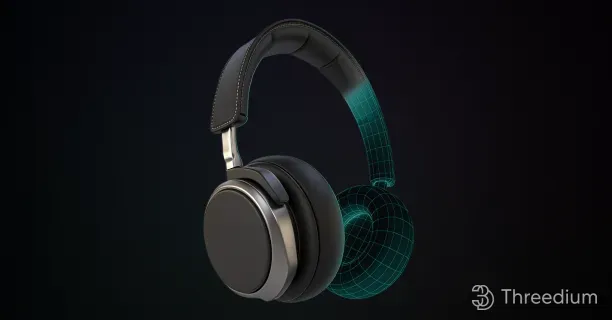
3D Models: Structure, Types, Uses, and Production
What is a 3D model?
A 3D model is a digital three-dimensional representation that simulates physical objects through computer-generated geometry, enabling virtual visualization and manipulation. Across numerous industries, these models transform real-world items into interactive digital forms. Essentially, a 3D model is crafted by organizing geometric data, defining the object’s appearance, dimensions, and structure. This setup facilitates its use in computer-aided design (CAD) and other applications.
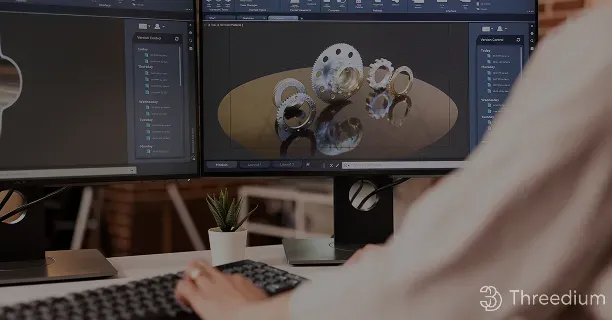
Polygonal meshes form the foundation of 3D models, comprising precisely positioned vertices, edges, and faces that interconnect to generate detailed surface geometry. This structure allows for the accurate recreation of complex shapes and intricate details, making polygonal meshes a popular choice due to their versatility and ease of digital manipulation.
This transformation is invaluable in fields such as:
- Architecture
- Engineering
- Entertainment
- Gaming
due to its capability to design, analyze, and visualize.
3D models deliver value through both their visual representation and interactive capabilities, enabling users to manipulate, analyze, and simulate virtual objects. This interactivity makes them ideal for simulations, prototyping, and testing within controlled environments.
Advanced Techniques and Terminologies
In 3D modeling, advanced techniques and terminologies enhance a model’s functionality:
| Technique | Description | Application |
|---|---|---|
| Tessellation | Divides surfaces into smaller parts for greater detail and smoothness | Enhanced surface quality |
| Topology | Examines the model’s fundamental structure, focusing on properties unchanged by transformations | Structural analysis |
| Parametric modeling | Allows for the adjustment of attributes through parameters | Easy modifications |
| Volumetric modeling | Concentrates on a model’s internal structure | Medical imaging applications |
| Photogrammetry | Constructs 3D models from photographs | Accurate shape and texture capture |
Volumetric modeling, which concentrates on a model’s internal structure, proves particularly useful in applications like medical imaging, where detailed internal representations are critical. Photogrammetry, another innovative technique, constructs 3D models from photographs, accurately capturing shapes and textures from multiple images.
Modern Terminology and Innovation
As 3D modeling progresses, new terminologies emerge to describe modern techniques and innovations:
- “Mesh-ready” - denotes models ready for immediate use
- “Poly-perfect” - describes models possessing high accuracy
- “3D-ification” - describes the transformation of real objects into digital forms
- “Vertexing” - highlights the precise placement of points for accurate shaping
Advanced Applications
Advanced applications of 3D modeling technology, specifically digital twins and MetaObjects, are increasingly adopted across industries for:
- System monitoring
- Data integration
- Predictive analysis
MetaObjects integrate multiple data sources, providing a comprehensive view of complex systems.
Summary
In summary, a 3D model is a dynamic tool bridging the real and virtual worlds. It leverages advanced techniques and technologies to:
- Foster innovation
- Streamline processes
- Enhance understanding
establishing itself as a pivotal component of contemporary digital workflows.
What are the main parts of a 3D model?
The main parts of a 3D model are vertices (points in 3D space), edges (lines connecting vertices), faces (flat surfaces), mesh (collection of polygons), texture maps (surface images), materials (surface properties), and skeleton/armature (for animation).
A 3D model is a digital representation of a three-dimensional object, composed of several key components that define its shape, texture, and behavior. Here, we explore the main parts of a 3D model, each contributing to the model’s overall appearance and function.
At the core of any 3D model are the Vertices. Vertices are precise mathematical points defined by X, Y, and Z coordinates in three-dimensional space, forming the fundamental structural framework of the 3D model.
When vertices connect, they form Edges, which are the straight lines between two vertices that establish the geometric framework.
Edges, in turn, combine to create Faces, which are the flat surfaces of a 3D model that define the boundary between the interior and exterior of the object. The connection of these faces forms the Surface Topology, determining the model’s outward appearance and texture application through manifold geometry principles.
| Component | Description | Function |
|---|---|---|
| Vertices | Points in 3D space (X,Y,Z coordinates) | Fundamental structural framework |
| Edges | Lines connecting vertices | Geometric framework establishment |
| Faces | Flat surfaces formed by edges | Define object boundaries |
| Mesh | Collection of polygons | Overall 3D shape structure |
The Mesh represents the collection of polygons (typically triangles or quadrilaterals) that form the overall 3D shape. The mesh density affects both the model’s visual quality and computational requirements:
- High-poly meshes: Contain many polygons for detailed surfaces
- Low-poly meshes: Use fewer polygons for optimization
- Subdivision surfaces: Allow smooth curves through mathematical interpolation
Texture Maps are 2D images applied to the 3D surface to provide visual detail without increasing geometric complexity. Common types include:
- Diffuse maps - Base color and patterns
- Normal maps - Surface detail simulation
- Specular maps - Reflectivity control
- Bump maps - Height variation effects
Materials define the surface properties that determine how light interacts with the model. Key material properties include:
- Albedo/Diffuse: Base color of the surface
- Roughness: Surface smoothness or texture
- Metallic: Whether the surface behaves like metal
- Emission: Self-illuminating properties
- Transparency: Light transmission through the material
The Skeleton/Armature is a hierarchical structure of bones used for animation purposes. This system includes:
- Bones - Individual joint elements
- Joints - Connection points between bones
- Weight painting - Influence distribution across the mesh
- Inverse kinematics (IK) - Automated bone movement calculations
UV Coordinates represent the 2D mapping system that determines how textures wrap around the 3D surface. The UV mapping process involves:
- Unwrapping: Converting 3D surface to 2D layout
- Seam placement: Strategic cuts for optimal texture flow
- Distortion minimization: Maintaining texture proportion accuracy
| UV Mapping Technique | Best Use Case | Advantages |
|---|---|---|
| Planar projection | Flat surfaces | Simple, minimal distortion |
| Cylindrical projection | Rounded objects | Good for tubes, bottles |
| Spherical projection | Globe-like objects | Ideal for spheres |
| Box projection | Cubic shapes | Quick, automated process |
Level of Detail (LOD) systems optimize performance by providing multiple versions of the same model with varying polygon counts:
- LOD 0: Highest detail for close viewing
- LOD 1: Medium detail for moderate distances
- LOD 2: Low detail for far distances
- LOD 3: Minimal detail for very distant objects
Normals are invisible vectors perpendicular to each face that determine how light reflects off the surface. Types of normals include:
- Face normals - Per-polygon lighting calculation
- Vertex normals - Smoothed lighting across vertices
- Custom normals - Artist-defined lighting behavior
Shaders are specialized programs that control the final appearance of the 3D model by processing vertices and pixels. Common shader types:
- Vertex shaders: Handle geometry transformation
- Fragment/Pixel shaders: Control surface appearance
- Geometry shaders: Modify mesh topology
- Tessellation shaders: Add geometric detail dynamically
The Bounding Volume defines the 3D space occupied by the model, crucial for:
- Collision detection: Physical interaction calculations
- Culling optimization: Rendering performance improvement
- Spatial organization: Scene management efficiency
Understanding these fundamental components enables 3D artists, developers, and engineers to create, modify, and optimize digital models effectively. Each element serves a specific purpose in the complex ecosystem of 3D modeling, from basic geometric structure to advanced rendering and animation capabilities.
3D Model Geometry: Vertices, Edges, and Faces
3D Model Geometry is a structural framework composed of three essential components - vertices (points), edges (lines), and faces (surfaces) - that form the foundation of all three-dimensional digital models. Understanding the fundamental principles of these geometric elements serves as the foundation for creating detailed and precise digital forms in computer graphics applications.
In the realm of 3D modeling, these three primary components serve as the building blocks of three-dimensional structures. These elements collectively create the framework that defines a 3D model’s shape, form, and functionality.
Vertices: The Foundation Points
Vertices, defined as fundamental geometric units in 3D modeling, represent precise mathematical points in three-dimensional space through coordinate specifications. Each vertex defines a unique spatial position through its precise X, Y, and Z coordinates within the three-dimensional coordinate system. This spatial information is essential for determining the position of a point within the model’s overall geometry.
The role of vertices extends beyond mere points; they serve as the anchors for the model’s structure, defining the starting and ending points for edges. The precision in vertex placement directly influences the accuracy and realism of the 3D model.
Key Characteristics of Vertices:
- Position Definition: Each vertex has specific X, Y, Z coordinates
- Structural Anchors: Serve as connection points for edges
- Precision Impact: Direct influence on model accuracy
- Mathematical Foundation: Represent precise points in 3D space
Edges: The Connecting Framework
Edges function as linear connectors between vertex pairs, establishing the fundamental wireframe structure and defining model boundaries in 3D space. They form the skeleton of the 3D model by outlining its basic shape and defining the boundaries of individual model components.
An edge connection is integral to establishing the framework upon which faces are constructed. In practice, edges can be straight or curved, depending on the design requirements. The configuration of edges influences the flow and smoothness of the model, impacting its overall topology.
The concept of “edge-loop” is particularly important in character modeling, where a series of connected edges is designed to follow the natural contours of a form, ensuring smooth deformations during animation.
Edge Properties and Functions:
- Linear Connections: Connect vertex pairs
- Wireframe Structure: Create the basic skeleton
- Boundary Definition: Define model component boundaries
- Topology Influence: Impact model flow and smoothness
- Animation Support: Enable smooth deformations
Faces: The Surface Definition
Faces represent the surface areas bounded by edges, creating the visible exterior of 3D models and determining how light interacts with the object. They are typically formed by connecting three or more vertices through edges, creating polygonal surfaces that define the model’s appearance.
The most common face types include:
- Triangular faces (3 vertices)
- Quadrilateral faces (4 vertices)
- N-gon faces (more than 4 vertices)
Face Characteristics Table:
| Face Type | Vertices | Advantages | Common Uses |
|---|---|---|---|
| Triangle | 3 | Stable geometry, easy rendering | Game models, complex surfaces |
| Quad | 4 | Smooth subdivision, better topology | Character modeling, animation |
| N-gon | 5+ | Flexible modeling | Conceptual work, specific applications |
The orientation of faces, determined by their normal vectors, affects how they interact with lighting and rendering systems. Proper face orientation ensures that surfaces are visible from the correct viewing angles and respond appropriately to lighting conditions.
Geometric Relationships and Interdependencies
The relationship between vertices, edges, and faces follows Euler’s formula for polyhedra:
This mathematical relationship ensures the structural integrity and topological correctness of 3D models.
Interdependency Hierarchy:
- Vertices define spatial positions
- Edges connect vertices to create structure
- Faces utilize edges to form surfaces
- Models combine all elements for complete geometry
Practical Applications and Considerations
Understanding these geometric fundamentals is crucial for various applications:
Industry Applications:
- Game Development: Optimized polygon counts for performance
- Animation: Proper topology for character deformation
- Architecture: Precise geometric representation
- Manufacturing: CAD model accuracy
- Virtual Reality: Real-time rendering optimization
Best Practices for Geometric Modeling:
- Maintain clean topology with proper edge flow
- Optimize vertex count for intended application
- Ensure proper face orientation for lighting
- Use appropriate polygon density for detail level
- Consider performance implications in real-time applications
The mastery of vertices, edges, and faces provides the foundation for advanced 3D modeling techniques and enables the creation of sophisticated digital content across multiple industries and applications.
UVs and Texture Coordinates in a 3D Model
UVs and texture coordinates in a 3D model are mapping systems that define how 2D textures are precisely wrapped and applied onto 3D geometric surfaces. Understanding UV mapping and texture coordinates is fundamental for creating photorealistic 3D models with precise surface detail rendering.
UV mapping establishes a texture coordinate system within UV space (0,1), defining precise mathematical relationships between:
- 2D texture pixels
- 3D model vertices
The UV Mapping Process
The UV mapping process involves the creation of a texture coordinate system, which is a two-dimensional space defining how textures are applied to a 3D model. UV coordinates represent specific surface points on the model.
| Component | Function | Purpose |
|---|---|---|
| UV Coordinates | Define surface points | Map 2D textures to 3D surfaces |
| Texture Atlas | Flat layout representation | Enable precise texture painting |
| UV Islands | Discrete map segments | Optimize texture distribution |
By defining the relationship between the 3D model’s surface and the 2D texture, UV mapping ensures textures are:
- Accurately positioned
- Properly scaled
- Maintained without distortion
This parametrization process is crucial for maintaining texture details, such as:
- Patterns
- Logos
- Surface characteristics
UV Unwrapping Techniques
Key to successful UV mapping is UV unwrapping, where the 3D model’s surface is unfolded into a flat layout. This layout, often referred to as a texture atlas, allows you to paint or project textures onto the model with precision.
UV unwrapping requires attention to details like:
- Seams - Connection points between UV islands
- Overlaps - Areas where UV coordinates intersect
- Stretching - Distortion prevention measures
Critical Components
UV islands, which are discrete segments of the UV map representing specific model surface regions, critically influence:
- Texture distribution
- Texel density optimization across 3D geometry
- Surface detail representation
Texture mapping on 3D models requires precise UV coordinate adjustment to accommodate surface curvature while minimizing texture distortion across complex geometries.
Advanced Mapping Techniques
Advanced techniques, such as UVW mapping, extend the concept of UV mapping by introducing a third axis (W) for more complex texture mapping scenarios.
| Mapping Type | Axes Used | Best For |
|---|---|---|
| UV Mapping | X, Y | Standard texturing |
| UVW Mapping | X, Y, Z | Complex geometries |
While not always necessary, UVW mapping can be useful for:
- Highly detailed models requiring intricate texture placement
- Models involving complex geometries
- Applications requiring multiple texture layers
Surface Curvature Considerations
Texture mapping in 3D modeling also involves considering how textures wrap around curved surfaces. This is achieved through:
- Careful adjustment of UV coordinates
- Matching the model’s curvature
- Preventing texture distortion
Mastering UV Mapping
Overall, mastering UV mapping and texture coordinates is vital for creating realistic 3D models. This process ensures textures are applied accurately, enhancing:
- Visual appeal
- Model realism
- Surface authenticity
By understanding the intricacies of UV mapping, from UV unwrapping to managing:
- UV islands
- Texel density
- Surface detail representation
You can produce models that stand out in detail and authenticity.
Through these techniques, you can maximize the potential of 3D models, ensuring they are not only:
- Geometrically accurate
- Visually compelling
- Professionally rendered
This understanding serves as a foundation for more advanced modeling techniques and applications, making UV mapping an indispensable skill for anyone involved in 3D design and production.
What types of 3D models exist?
Types of 3D models that exist are wireframe models, polygon models (polygon meshes), NURBS models, and point cloud models, each offering unique characteristics and suited for specific applications. Understanding these types enhances your ability to select the appropriate method for your 3D modeling needs.
Wireframe Models
The field of 3D modeling encompasses multiple distinct model categories, with each type possessing unique technical characteristics and specific industrial applications.
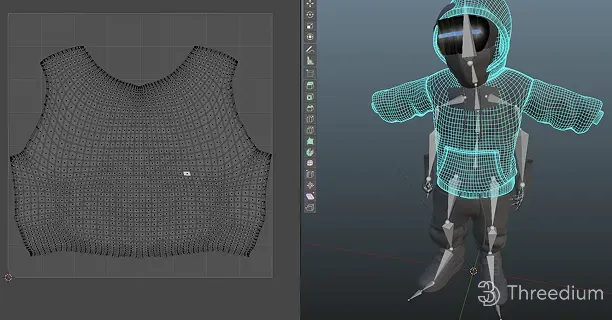
Wireframe models serve as the fundamental structural framework in 3D modeling, representing objects through interconnected points and lines that define their geometric boundaries.
Polygon models are constructed from interconnected geometric shapes, primarily triangles and quadrilaterals, which combine to generate detailed three-dimensional surface representations.
NURBS curves require a minimum of three control points to mathematically generate smooth, precise geometric shapes, enabling high-accuracy surface modeling.
Point cloud models serve as essential digital representations for applications requiring precise real-world data capture, utilizing advanced scanning technologies like LiDAR and photogrammetry for accurate spatial documentation.
Polygon Models (Polygon Meshes)
Moving beyond wireframes, polygon models incorporate faces along with vertices, delivering a more detailed depiction of objects. These models are made from interconnected polygons, often quadrilaterals or triangles, which define surfaces via tessellation.
Widely used in: - Graphics - Animation - Gaming
These models are essential for applications requiring visual detail and texture, as their topology allows for:
- Realistic character animation
- Real-time rendering
NURBS Models
NURBS (Non-Uniform Rational B-Splines) represent a sophisticated mathematical approach to 3D modeling, utilizing control points and mathematical curves to create smooth, precise surfaces.
| Characteristic | Description |
|---|---|
| Mathematical Foundation | Uses rational B-spline basis functions |
| Surface Quality | Produces smooth, continuous surfaces |
| Control Method | Control points influence curve shape |
| Applications | CAD, automotive design, aerospace |
Key advantages of NURBS models include:
- Precision in geometric representation
- Smooth surface generation
- Mathematical accuracy
- Scalability without quality loss
Point Cloud Models
Point cloud models consist of a collection of data points in three-dimensional space, typically generated through:
- 3D scanning technologies
- Photogrammetry
- LiDAR systems
- Structured light scanning
Each point in the cloud represents a specific location in 3D space and may contain additional information such as:
- Color values
- Intensity measurements
- Normal vectors
- Reflectance data
Applications of point cloud models:
- Reverse engineering
- Cultural heritage preservation
- Architecture and construction
- Topographic mapping
- Quality control and inspection
Choosing the Right Model Type
The selection of an appropriate 3D model type depends on several critical factors:
| Factor | Wireframe | Polygon | NURBS | Point Cloud |
|---|---|---|---|---|
| Detail Level | Low | Medium-High | High | Very High |
| File Size | Small | Medium | Medium | Large |
| Rendering Speed | Fast | Medium | Slow | Variable |
| Precision | Low | Medium | Very High | Extremely High |
Considerations for model selection:
- Project requirements
- Available computational resources
- Target application
- Required level of detail
- Budget constraints
What are 3D models used for?
3D models are used for a wide variety of applications across numerous industries, transforming how we visualize, design, and interact with digital content. These versatile digital representations serve as the foundation for countless creative and technical endeavors.
Entertainment and Media
- Video Games: Creating immersive characters, environments, and objects
- Movies and Animation: Developing realistic visual effects and animated sequences
- Virtual Productions: Enabling real-time rendering for film and television
Professional Industries
Architecture and Construction:
- Building Visualization - Creating detailed architectural renderings
- Design Validation - Testing structural integrity before construction
- Client Presentations - Showcasing projects to stakeholders
Manufacturing and Engineering:
| Industry | Primary Use | Benefits |
|---|---|---|
| Automotive | Prototype Development | Reduced costs and faster iteration |
| Aerospace | Component Testing | Enhanced precision and safety |
| Medical | Surgical Planning | Improved patient outcomes |
Emerging Technologies
Key Applications Include:
- Virtual Reality Experiences - Immersive training simulations
- Augmented Reality - Overlaying digital content on real environments
- Metaverse Platforms - Building persistent virtual worlds
Educational and Scientific Applications
Research and Development:
- Scientific Modeling - Visualizing complex molecular structures
- Historical Reconstruction - Recreating ancient civilizations
- Training Simulations - Safe practice environments for professionals
Academic Uses:
- Interactive Learning - Engaging students with 3D content
- Research Visualization - Making abstract concepts tangible
- Collaborative Projects - Enabling remote teamwork
What factors determine 3D model quality?
Factors that determine 3D model quality are polygon count, texture resolution, mesh topology, UV mapping, file format, mesh density, level of detail systems, vertex count, material shaders, and triangulation quality.
Professional 3D model evaluation requires assessment of specific technical attributes that determine visual fidelity, performance efficiency, and functional capabilities. Mastering these elements is pivotal to producing top-tier 3D models that adhere to professional standards.
A 3D model’s polygon count directly influences its visual detail level, geometric complexity, and rendering performance capabilities. It directly affects rendering performance and visual realism.
This range balances detail and performance efficiency, as excessive polygons can cause performance bottlenecks, especially in real-time applications. Triangulation is preferred in modern graphics engines, making the triangle count, or tricount, an essential metric.
Texture Resolution: Texture resolution significantly impacts the visual quality of a 3D model. High-resolution textures, typically 4K (4096x4096 pixels), are standard for professional models, offering crisp and detailed appearances.
However, aligning texture resolution with model usage is crucial, as unnecessary high resolutions can increase file size and processing demands. Texture map resolutions generally range from 72 to 300 DPI depending on application needs, with texel density determining visual fidelity.
| Texture Resolution | Use Case | File Size Impact |
|---|---|---|
| 1K (1024x1024) | Mobile games, background objects | Low |
| 2K (2048x2048) | Standard game assets | Medium |
| 4K (4096x4096) | Professional/cinematic models | High |
| 8K (8192x8192) | High-end visualization | Very High |
Mesh topology refers to the arrangement and flow of polygons within a 3D model. Clean topology ensures smooth deformation during animation and maintains visual quality across different viewing angles.
Key topology considerations include:
- Edge flow alignment with natural muscle and bone structure
- Consistent polygon distribution across the model surface
- Avoiding n-gons (polygons with more than four sides)
- Maintaining quad-based geometry where possible
UV mapping quality determines how textures wrap around the 3D model surface. Proper UV unwrapping minimizes texture distortion and maximizes texture space utilization.
Essential UV mapping principles:
- Minimize seams in visible areas
- Maintain consistent texel density across UV islands
- Optimize UV layout for texture atlas efficiency
- Avoid texture stretching and compression
File format selection impacts model compatibility, compression efficiency, and feature support. Common professional formats include:
- FBX: Industry standard for animation and rigging
- OBJ: Simple geometry with material support
- glTF: Web-optimized with PBR material support
- Alembic: High-fidelity geometry caching
Mesh density distribution affects both visual quality and performance optimization. Strategic polygon placement concentrates detail where needed while maintaining efficiency in less visible areas.
Optimal mesh density strategies:
- Higher density in hero objects and close-up areas
- Reduced density in background elements
- LOD systems for distance-based optimization
- Adaptive subdivision based on surface curvature
Level of Detail (LOD) systems automatically adjust model complexity based on viewing distance or performance requirements. Professional LOD implementation typically includes:
| LOD Level | Polygon Reduction | Viewing Distance |
|---|---|---|
| LOD 0 | 0% (Full detail) | Close-up |
| LOD 1 | 25-50% reduction | Medium distance |
| LOD 2 | 50-75% reduction | Far distance |
| LOD 3 | 75-90% reduction | Very far/occluded |
Vertex count optimization balances geometric detail with performance requirements. Efficient vertex usage considers:
- Shared vertices between adjacent polygons
- Vertex attributes (position, normal, UV, color)
- Memory bandwidth limitations
- Cache optimization for GPU efficiency
Material shaders and their complexity significantly impact both visual quality and rendering performance. Modern PBR (Physically Based Rendering) workflows require:
- Albedo maps for base color information
- Normal maps for surface detail simulation
- Roughness maps for surface finish control
- Metallic maps for material type definition
- Ambient occlusion for contact shadows
Triangulation quality ensures optimal GPU processing and prevents rendering artifacts. Clean triangulation characteristics include:
- Consistent winding order for proper face culling
- Avoiding degenerate triangles (zero area)
- Optimal triangle shape (avoiding extremely thin triangles)
- Proper normal calculation for lighting accuracy
Quality assessment metrics for professional 3D models include:
- Polygon efficiency ratio: Detail per polygon count
- Texture memory usage: MB per model complexity
- Rendering performance: Frame rate impact
- Visual fidelity score: Subjective quality assessment
- Technical compliance: Industry standard adherence
Optimization best practices for maintaining high-quality 3D models:
- Regular mesh cleanup to remove duplicate vertices
- Consistent naming conventions for assets and materials
- Version control for iterative improvements
- Performance profiling across target platforms
- Quality assurance testing in final implementation environments
Understanding and implementing these quality factors ensures that 3D models meet professional standards while maintaining optimal performance across various applications and platforms.
How are 3D models created?
3D models are created through multiple methods including computer-based 3D modeling software, 3D scanning technologies, and photogrammetry techniques, each requiring specific tools and expertise. This comprehensive process integrates artistic design principles, advanced technology applications, and specialized technical expertise to create three-dimensional digital representations.
The process begins with an idea, which you can transform into a digital or physical form using various methods. The primary creation methods encompass:
- Computer-based 3D modeling software
- Precision 3D scanning technologies using laser or structured light
- Photogrammetry techniques that reconstruct 3D models from multiple 2D photographs
3D modeling software is pivotal in this creation process, offering a platform for designing and manipulating models. Leading software options include:
- Autodesk Maya
- Blender
- 3ds Max
These tools provide capabilities like polygon modeling, where you can construct mesh structures by manipulating vertices, edges, and faces. This method is favored for its versatility in crafting detailed models.
Sculpting software grants you precise control over the model’s form, allowing for the creation of highly detailed textures.
Computer-aided design (CAD) tools are essential for engineering precise mechanical components and architectural structures, maintaining dimensional accuracy through parametric modeling and mathematical constraints. In engineering and architecture, parametric modeling where parameters and constraints define the geometry.
Photogrammetry is an innovative method that constructs 3D models from photographs. This technique involves:
- Capturing multiple images of an object from various angles
- Software reconstruction of the object in three dimensions
Photogrammetry is particularly effective for creating realistic models of existing objects, such as historical artifacts and landscapes.
3D scanning technology offers another approach, capturing the shape of physical objects using lasers or structured light. Scanners, from handheld to industrial sizes, gather geometric data to produce digital models. Scanning is crucial for applications like:
| Application | Description |
|---|---|
| Reverse Engineering | Creating models from existing products |
| Quality Control | Verifying manufactured parts accuracy |
| Cultural Heritage Preservation | Digitizing historical artifacts |
Within these primary methods, specialized techniques further refine models. Topology and tessellation optimize models for animation and rendering by organizing the geometry for smooth deformation and efficient rendering. Subdivision surfaces enhance models by smoothing and increasing detail levels.
Advanced methods like Boolean operations enable complex manipulations by combining or subtracting shapes. Vertex manipulation and extrusion allow precise model shaping, while decimation and retopology improve performance by reducing polygon count and enhancing mesh structure.
Emerging technologies, including artificial intelligence-assisted modeling tools, real-time rendering engines, and automated optimization systems, continuously expand the capabilities and efficiency of 3D modeling workflows.
Innovations include:
- Sculpt-to-CAD workflows
- Poly-pushing techniques that merge sculpting with precision modeling
- Geo-modeling and Scan-to-BIM (Building Information Modeling)
- Photoscan and Auto-retopo for streamlined data conversion
- Smart-mesh and Edge-flow for improved modeling efficiency
Whether you are crafting a video game character, designing a new product, or preserving a historical site, the tools and techniques available for 3D modeling offer unparalleled creative freedom and precision. As technology progresses, so do the opportunities for innovation in this dynamic field.
Which 3D modeling systems are supported by Threedium?
The 3D modeling systems supported by Threedium are:
- Autodesk 3ds Max
- Maya
- Blender
- SketchUp
- Cinema 4D
- ZBrush
- Rhino
- SolidWorks
- Fusion 360
This broad support facilitates efficient workflows and model optimization, establishing Threedium as a pivotal hub for 3D content creation.
Professional 3D Modeling Software Integration
Autodesk 3ds Max, a professional 3D modeling software, integrates natively with Threedium’s ecosystem, providing comprehensive support for:
- Advanced polygonal modeling
- Subdivision surface workflows
- Robust modeling, animation, and rendering capabilities
The seamless export of models ensures their integrity is preserved throughout the digital pipeline.
Maya, Autodesk’s flagship solution, features advanced modeling techniques that integrate smoothly with Threedium. Its capabilities include:
- Polygonal modeling
- Subdivision surface modeling
- NURBS outputs
- Volumetric outputs
These transition effortlessly into Threedium’s real-time rendering pipeline, maintaining the integrity of complex geometries.
Open-Source and Specialized Solutions
Blender, an open-source powerhouse, demonstrates strong compatibility with Threedium. Its wide array of features include:
- NURBS surface modeling
- Volumetric rendering
- Traditional modeling techniques
- Procedural modeling techniques
These translate effectively within Threedium’s cloud-optimized environment for web3D content creation.
SketchUp integration offers architectural and landscape designers direct access to optimization features. Threedium supports:
| Feature | Benefit |
|---|---|
| Component-based modeling | Maintains precision for architectural visuals |
| Auto-retopology | Enhances outputs for real-time interaction |
Motion Graphics and Digital Sculpting
Cinema 4D expands Threedium’s reach into motion graphics and design sectors, supporting:
- Parametric modeling
- Procedural workflows
- Complex shader networks
- Animations essential for dynamic content creation
ZBrush integration caters to high-resolution digital sculpting needs. Threedium supports ZBrush’s detailed sculpting outputs, utilizing:
- Advanced topology optimization
- Dense mesh conversion to real-time assets
- Critical detail preservation through normal mapping
Professional Engineering Solutions
Professional engineering and industrial design workflows benefit from Threedium’s comprehensive integration with:
| Software | Key Features | Integration Benefits |
|---|---|---|
| Rhino | NURBS-based modeling system | Precision through advanced algorithms |
| SolidWorks | Parametric design capabilities | Smooth parametric structure handling |
| Fusion 360 | Cloud-based development environment | Aligned architecture for data exchange |
Advanced Technical Capabilities
Threedium employs advanced tessellation algorithms to convert complex geometric data into optimized meshes for real-time rendering. Its photogrammetry capabilities also support reality capture workflows, seamlessly integrating scanned assets with traditional models.
Cross-Platform Compatibility
Threedium ensures robust cross-platform compatibility through industry-standard file formats:
- FBX
- OBJ
- COLLADA
- glTF
This maintains complete fidelity of:
- Materials
- Textures
- Complex 3D data structures
Throughout the conversion process, Threedium’s import pipeline processes materials, textures, and animations from source applications, ensuring consistency. Its UV mapping preservation guarantees accurate texture coordinates during optimization.
Summary
This empowers creators across industries to use their preferred tools while leveraging Threedium’s optimization and rendering technologies for interactive 3D development.